

Elk Country RV Resort & Campground has been a client of ours since 2012. It’s a remote resort, which is a big part of the appeal for guests. It’s also hard on an internet connection.
This post walks through the problem the resort had, why the usual answers didn’t fix it, and what we built instead: a multi-WAN connection made from several Starlink terminals plus Verizon and T-Mobile LTE, bonded through Peplink SpeedFusion. If you run a business somewhere the cable company never came, this is the pattern I’d look at first.
The problem: one slow, high-latency link
The resort was stuck on high-latency satellite internet. That’s the whole problem in one line, but it’s worth spelling out what it means day to day for a business like this.
Latency is the delay for a packet to make the round trip. Old-style satellite service has to bounce every packet off a satellite far above the earth and back, so even when the bandwidth looks fine on paper, everything feels slow. Web pages hang before they start loading. Video calls lag and people talk over each other. Anything interactive, like a remote desktop session, a card terminal waiting on an approval, or a VPN, gets sluggish or drops.
And it was a single link. When it had a bad day, the whole property had a bad day.
Why the obvious fixes don’t work out there
When I talk to rural business owners, the first suggestions they’ve usually already heard are:
- “Just get cable or fiber.” If it were on the street, they would have it. In a lot of the North Coast it isn’t, and it isn’t going to be next month.
- “Switch to a better satellite plan.” Low-earth-orbit service like Starlink is a big improvement over the old high-latency satellite, and it’s part of what we did. But one Starlink terminal is still one connection with one view of the sky, and trees, weather and obstructions all affect it.
- “Get a cellular hotspot.” Cell coverage in forested, hilly country changes from one side of a hill to the other, and from one carrier to the next. One carrier on its own is a gamble.
Each of those is a single path to the internet. The real fix for a remote site isn’t finding the one perfect connection. It’s using several imperfect ones together so they cover for each other.
What we built
We built a multi-WAN connection from:
- Several Starlink terminals, for the bulk of the capacity and much lower latency than the old satellite service
- Verizon LTE and T-Mobile LTE, two separate carriers, so a problem on one cellular network doesn’t take out the cellular side entirely
All of those links come into a Peplink router at the resort and are bonded through Peplink SpeedFusion for failover.
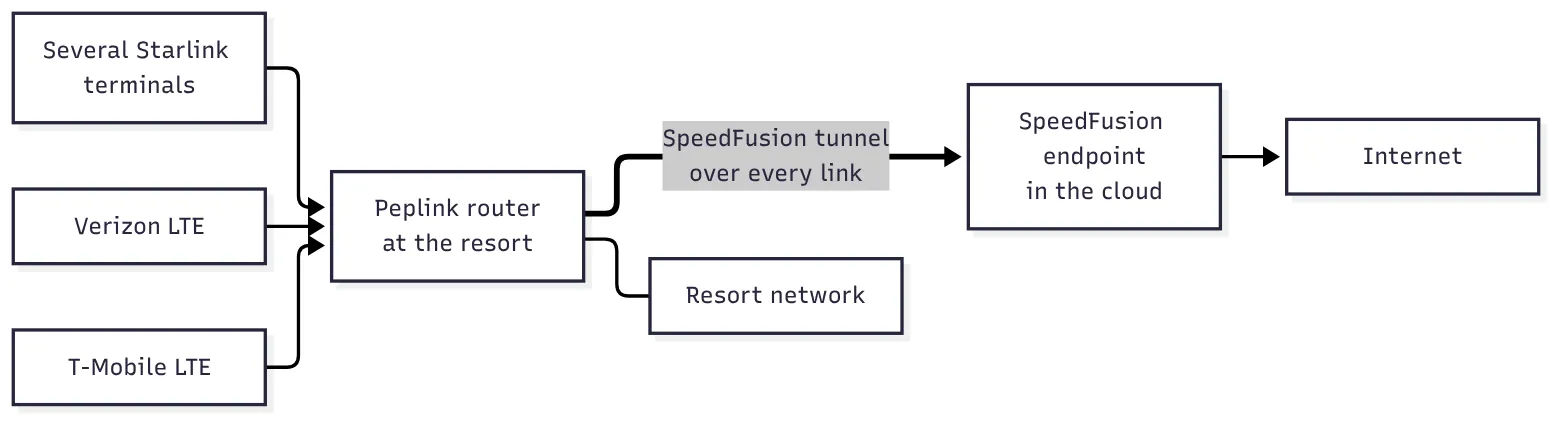 How the links come together: every connection carries the same SpeedFusion tunnel, so the resort sees one connection to the internet.
Why SpeedFusion and not plain failover
Most routers can do basic failover: when the primary link dies, they switch to the backup. The catch is that “switch” means every open connection has to start over on the new link. Phone calls drop, VPNs reconnect, a card transaction in progress fails, and someone has to try again.
SpeedFusion works differently. The Peplink router builds an encrypted tunnel over every connection to a SpeedFusion endpoint in the cloud, and that endpoint hands the traffic to the internet. Because the tunnel is already up on all the links, when one link degrades or drops, traffic moves to the ones that are still working and the session carries on. From the outside, the resort has one steady connection, even though underneath it’s several.
SpeedFusion has a few modes, and the right one depends on the traffic:
- Bonding combines the links so a single big transfer or backup can use all of them at once.
- Hot Failover keeps sessions alive when a link goes away. This is the one that matters most for a business that can’t afford a dropped call or payment.
- WAN Smoothing sends copies of important packets over more than one link and uses whichever arrives first. It’s meant for voice, video and payments.
- Forward Error Correction (FEC) adds a small amount of recovery data so lost packets can be rebuilt instead of re-sent, which is useful on lossy or metered links.
📝 Note: None of this makes a bad link good. What it does is make sure one bad link doesn’t become everyone’s problem.
Why two cellular carriers
It’s tempting to save money with one cellular plan as the backup. The problem is that a carrier outage, or a tower that’s congested on a holiday weekend, takes your only backup with it. Two different carriers fail for different reasons at different times. Combined with Starlink, that gives the resort three independent kinds of path to the internet: satellite, one cell network, and another cell network.
It’s not just the connection
The internet connection was one piece of a longer relationship. Elk Country is a managed IT client, and we’ve also built them a guest Wi-Fi sign-in portal and site-wide video surveillance. I mention that because a connection like this needs someone watching it. Starlink terminals need their view of the sky kept clear, cellular plans and SIMs need managing, and someone has to notice when one link is quietly underperforming before the other links run out of room to cover for it.
If you’re in the same spot
If you run a remote business on one slow or unreliable link, here’s what I’d work through, in this order:
- Find out what can actually reach you. Not from a coverage map. Walk the property, check the sky view where a Starlink terminal would go, and test the signal on each cellular carrier at the spot the antenna would mount.
- Plan for at least two different kinds of connection. Satellite plus cellular, or a wireless bridge plus cellular. Two of the same thing tend to fail together.
- Decide what traffic can’t drop. Phones, payments and remote access to your systems are usually the list. That tells you whether plain failover is enough or whether you want bonding with hot failover or WAN smoothing.
- Put the network core on battery backup. Multiple internet links don’t help if the router reboots every time the power flickers.
- Monitor every link, not just “is the internet up.” With bonding, the internet can stay up while one link is dead for days. You want to know about that before the next one goes too.
- Budget for the ongoing part. Several connections mean several service plans, and someone has to keep an eye on them. Count that in from the start.
Use at your own risk applies here like anywhere: every site is different, and what worked at one property is a starting point for the next one, not a template.
Get in touch
If you’re running a business, a campground, a ranch office or anything else where “just call the cable company” isn’t an option, we’re happy to come out and look. We start with a walk of the property and a site assessment before we recommend anything.
Related services
- Rural connectivity: Starlink, multi-carrier LTE/5G, point-to-point wireless and Peplink SpeedFusion
- Managed IT services: monitoring, patching, backups and support for the whole site