
Most of the PHP I worry about isn’t the company website. It’s the monitoring server, the invoicing app, the wiki, the help desk, the old intranet page nobody’s touched in years, and whatever the NAS or the hosting panel is running under the hood. That’s the PHP that tends to get missed when something like this week’s PHP2Shell release comes along.
On Wednesday, the PHP project shipped emergency fixes for two critical remote code execution bugs, collectively nicknamed PHP2Shell. Exploit attempts are already showing up. If you run anything PHP that faces the internet, this is a patch-this-week item, not a next-maintenance-window item.
Here’s what’s going on, why your setup matters, and how I’d work through it across a client base.
What happened
- October 20: PHP pre-announced a critical security release for two vulnerabilities.
- October 21: PHP released fixed versions 8.5.12, 8.4.27, 8.3.36 and 8.2.35 for CVE-2026-109618 and CVE-2026-109619. Both are rated 9.2 under CVSS 4.0. The coordinated disclosure had been planned for the next day, but details leaked and the release was pulled forward.
- The same day, distributions started shipping backported fixes. Ubuntu published USN-8948-1.
- Since then: watchTowr has reported in-the-wild exploit attempts against its honeypots, and other vendors have reported probing. As of this writing I haven’t seen a publicly documented successful intrusion pinned on PHP2Shell, but with a leaked proof of concept, I wouldn’t wait for one.
The two bugs, in plain terms:
- CVE-2026-109618 is memory corruption when PHP runs out of memory partway through setting up a request. A crafted multipart request can leave PHP’s internal state half-built, and later cleanup treats it as valid.
- CVE-2026-109619 is a “stale global state” bug: a fatal error can leave references to freed memory behind, and the next request handled by the same worker can reuse that memory. The Session Upload Progress feature, which is on by default, is one confirmed path.
The important detail is when this happens: during request startup, before your application code runs. Your WordPress security plugin, your app’s login page and your input validation never get a look at it.
Why your PHP setup matters
PHP2Shell affects PHP serving web requests under every common setup: Apache with mod_php, PHP-FPM, php-cgi, FrankenPHP and LiteSpeed. The PHP team rates Apache mod_php as the highest risk. Code runs with the web server worker’s privileges.
That’s worth a second look if you’ve followed my LibreNMS on Ubuntu 22.04 guide. It installs Apache together with Ubuntu’s php package, and on that combination apt normally picks mod_php. Lots of small-office installs of all kinds of apps end up the same way, because it’s the path of least resistance.
📝 Note: PHP says no configuration change fully closes these bugs. Turning off session upload progress or changing memory limits might narrow one path, but the fix is the patch. A web application firewall rule is a stopgap at best.
Checking a backported fix
This is the part that trips people up. Distributions backport the fix into the PHP version they already ship, so the version number doesn’t change. On Ubuntu 24.04, the patched package is 8.3.6-0ubuntu0.24.04.13, and php -v still says 8.3.6. If you’re comparing php -v against the upstream fixed list, a patched Ubuntu box looks vulnerable, and an unpatched one looks no different.
What does change is the package changelog. Here’s the Bash script I’d push to every Debian or Ubuntu host. It finds each installed PHP branch, checks that branch’s changelog for the two CVE IDs, and lists the services you need to restart afterwards:
#!/usr/bin/env bash
# php2shell-check.sh: are this Debian/Ubuntu host's packaged PHP builds patched for PHP2Shell?
# Exit code 0 = all packaged PHP branches mention the fix, 1 = something to check.
set -uo pipefail
cves=(CVE-2026-109618 CVE-2026-109619)
status=0

mapfile -t pkgs < <(dpkg-query -W -f='${db:Status-Abbrev}${Package}\n' 'php[0-9]*-common' 2>/dev/null | awk '$1 ~ /^.i/ {print $2}')
if [[ ${#pkgs[@]} -eq 0 ]]; then
    echo "No packaged PHP found. Still check containers, control panels and source builds."
    exit 0
fi

for pkg in "${pkgs[@]}"; do
    ver=$(dpkg-query -W -f='${Version}' "$pkg")
    log="/usr/share/doc/$pkg/changelog.Debian.gz"
    missing=()
    for cve in "${cves[@]}"; do
        [[ -r $log ]] && zgrep -q "$cve" "$log" || missing+=("$cve")
    done
    if [[ ${#missing[@]} -eq 0 ]]; then
        echo "OK     $pkg $ver"
    else
        echo "CHECK  $pkg $ver (changelog doesn't mention: ${missing[*]})"
        status=1
    fi
done

echo
echo "Running PHP and web services (restart these after patching):"
systemctl list-units --type=service --state=running --no-legend --plain \
    'php*-fpm.service' 'apache2.service' 'nginx.service' 'lsws.service' 2>/dev/null |
    awk '{print "  " $1}'
exit $status
On a patched Ubuntu 24.04 host it prints:
OK php8.3-common 8.3.6-0ubuntu0.24.04.13The exit code makes it easy to run from an RMM and open a ticket on 1. If you’d rather sweep a handful of servers by hand over SSH:
for host in librenms invoices wiki; do
    echo "== $host"
    ssh "$host" 'bash -s' < php2shell-check.sh
done
Containers are the other blind spot. The official PHP images report the upstream version, so there php -v is meaningful and you can compare it against the fixed list:
docker ps --format '{{.Names}}' | while read -r c; do
    v=$(docker exec "$c" php -r 'echo PHP_VERSION;' 2>/dev/null) && echo "$c: PHP $v"
done
Anything below 8.5.12, 8.4.27, 8.3.36 or 8.2.35 on its branch needs a new image, which usually means waiting on the app’s maintainer to rebuild, or rebuilding it yourself.
The patch workflow I’d use
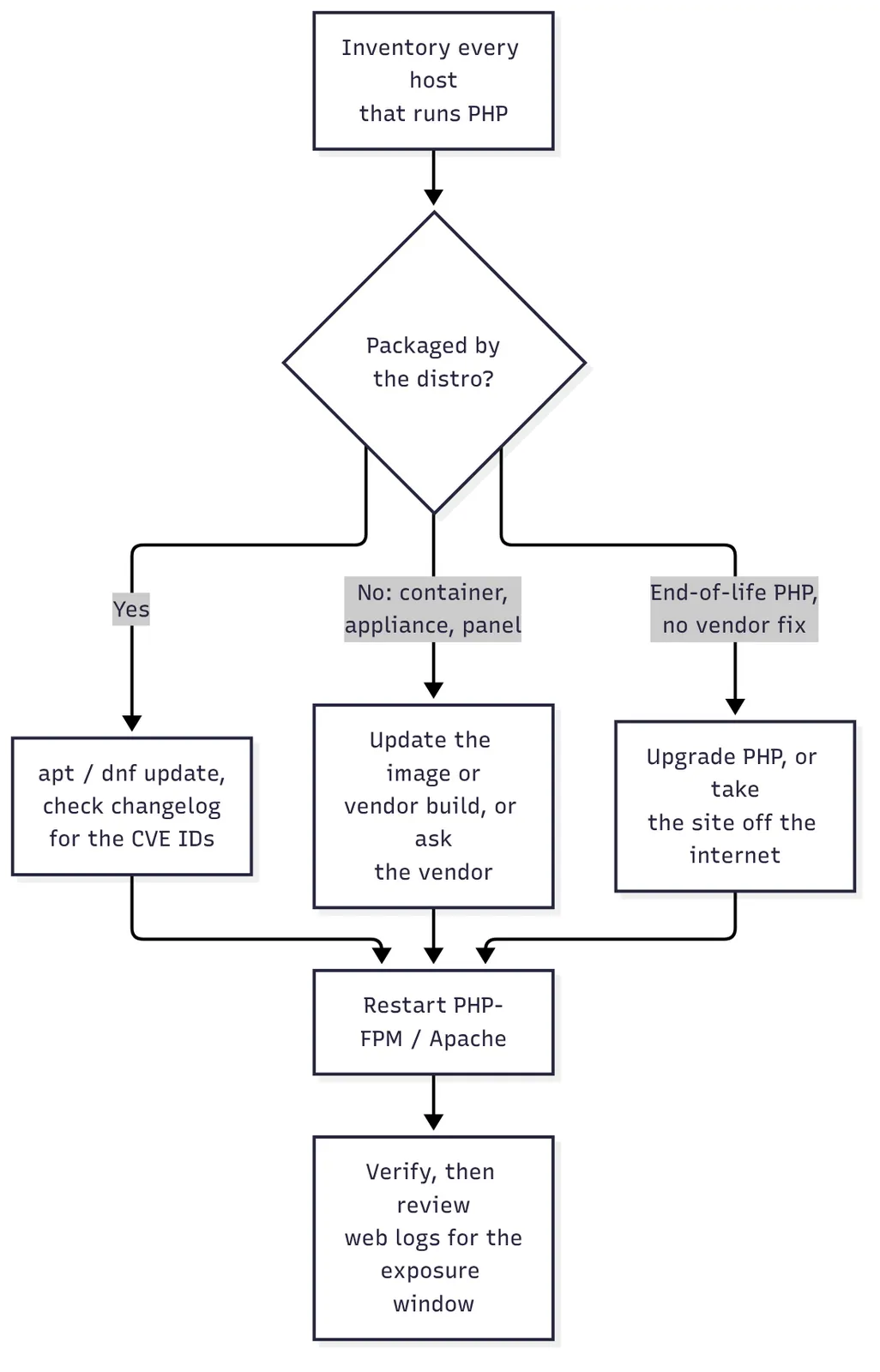 How I’d triage PHP2Shell across a client base.
- Inventory first. Every server, VM and container that runs PHP, including the ones that aren’t “websites”: monitoring, invoicing, ticketing, wikis, file-sharing apps, intranet pages. Internet-facing ones go to the top.
- Patch the distro packages.
sudo apt update && sudo apt upgrade(ordnf upgrade), then run the check script. Don’t trust the version banner. - Restart PHP. The old code stays in memory until the process restarts. Restart PHP-FPM and Apache, or just reboot the box if you can.
- Chase the things you don’t package yourself. Docker images, hosting control panels and appliances that bundle PHP all need an update from whoever builds them. If there’s no fix yet, restrict access to the whole service, not just its admin pages, at the firewall or reverse proxy (VPN or known IPs only), or take it offline until there is. The bug fires before the app’s own login, so any PHP page is a way in.
- Deal with end-of-life PHP honestly. PHP 8.1 and older don’t get releases from the PHP project anymore. PHP published source-only backports for 7.4, 8.0 and 8.1, and distributions that still support those branches can ship fixes (Ubuntu covers the PHP 8.1 that 22.04 ships). If you’re on an old PHP with no vendor fix, the answer is to upgrade or take the site off the internet, not to wait.
- Look back. Exploitation happens before your app’s own logging sees anything, so check web server logs and the box itself for anything unusual since the leak, especially on internet-facing mod_php hosts.
What I tell clients
Most clients don’t know which of their systems run PHP, and they shouldn’t have to. What I tell them is: “If it has a web page you log into, assume it might, and let us check.” The client’s job is to tell us about the app their nephew set up or the vendor portal on the old server in the closet. Our job is to have the inventory, patch it this week, and confirm the patch actually took.
The hard part of PHP2Shell isn’t the patch. It’s finding every place PHP is hiding. If you don’t have that list, this is a good week to start one.
Sources
- PHP2Shell: Find, Mitigate, and Patch Now, Qualys, October 20, 2026
- PHP2Shell PHP vulnerabilities patched (CVE-2026-109618, CVE-2026-109619), Help Net Security, October 21, 2026
- USN-8948-1: PHP vulnerabilities, Ubuntu, October 21, 2026
- PHP2Shell RCE Exploited: CVE-2026-109618 & CVE-2026-109619, watchTowr, October 2026