
A lot of small offices end up in the same place without anyone choosing it. Files live on whichever laptop someone was using that day. There’s a storage box in the corner that’s reachable from the internet in a way nobody has looked at in years. And the phone bill comes from the same internet provider everyone’s already frustrated with.
That was roughly the situation at the Mattole Salmon Group, a nonprofit in the Mattole Valley that does watershed restoration. This post is about the office side of the work we did for them: getting their files off laptops and off an exposed NAS, and moving their phones. (We also fixed their internet with a point-to-point radio mounted in a tree, but that’s a story for another post.)
The problem, in their terms
There were three things getting in the way of everyday work:
- Files were everywhere. Data was spread across staff computers, and large files were hard to share. If you needed something someone else had, you had to track down which machine it was on.
- The NAS was a risk. The network-attached storage (NAS) at headquarters was reachable from the internet over FTP, an old and insecure protocol. That was a serious cybersecurity problem.
- The phones cost too much. Phone service came from the same unreliable internet provider, and the price had gotten too high.
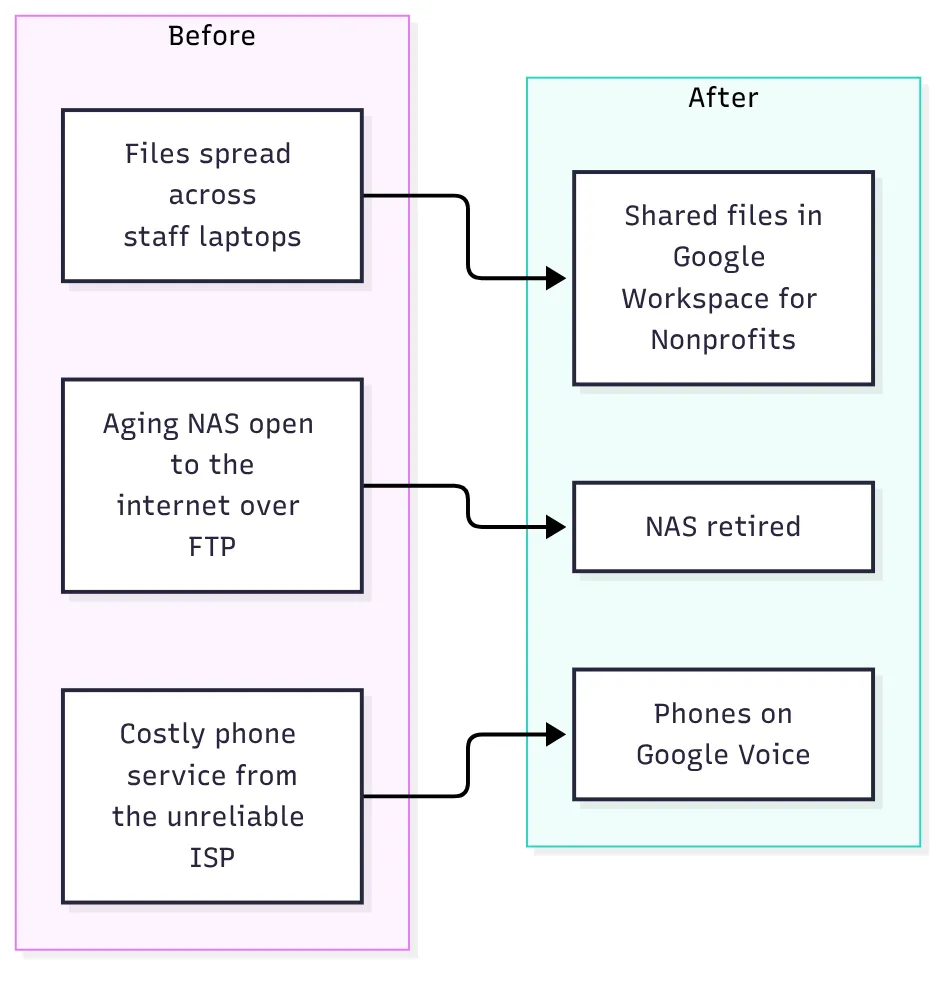 Three problems, three changes.
Why we didn’t just patch the NAS
The obvious fix for “the NAS is exposed over FTP” is to tighten up the NAS: turn off FTP, switch to something encrypted, put it behind a VPN. In plenty of offices, that’s the right call.
Here, it would have fixed one problem and left the others. Files would still be spread across laptops, large files would still be hard to share, and the office would still be relying on an aging box on-site, behind an internet connection that wasn’t reliable.
So rather than patch around it, we retired the NAS.
Why FTP on the internet is a problem
For anyone who hasn’t had to think about this: FTP is from an era when nobody worried about who was listening on the network. It sends usernames, passwords and files without encryption, so anyone in a position to see the traffic can read all three. And a NAS that answers on the open internet gets found. Automated scanners sweep the whole internet looking for exactly that kind of service, and they don’t care how small or remote your office is.
If you’re not sure whether your own office has something like this, here’s a quick check. Run it from a machine outside your network (a laptop on a phone hotspot works), and point it at your office’s public IP address:
# Run from OUTSIDE the office network. Replace with your office's public IP.
OFFICE_IP=203.0.113.10

# Common file-sharing and NAS ports: FTP, SSH/SFTP, SMB, and typical NAS web admin ports
nmap -Pn -p 21,22,445,5000,5001,8080,8443 "$OFFICE_IP"
Any port that comes back open is something the whole internet can reach. Port 21 (FTP) or 445 (SMB) open to the world is a stop-what-you’re-doing finding. Others may be intentional, but you should know why each one is open.
📝 Note: Only scan addresses you own or are responsible for. And run it from outside: testing from inside the office often gives misleading results, because many routers handle traffic to their own public address differently.
What we did
Moved the files to Google Workspace for Nonprofits
We moved the organization’s data to Google Workspace for Nonprofits. Google offers Workspace to eligible nonprofits through its nonprofit program, and it gives an organization shared drives, email, calendars and document editing in one place.
For the Mattole Salmon Group, that meant:
- Shared files in one place, instead of on individual laptops.
- Access from anywhere. Staff can reach shared files from the office, the field or home, without a box on the office network having to be open to the internet.
- Large files without workarounds, and documents people can work on together.
- Google’s security protections in place of an aging NAS on the internet.
Retired the NAS
Once the data had a new home, the NAS was retired. That closed the FTP exposure completely. Nothing to patch, nothing to monitor, nothing left answering on that port.
Moved the phones to Google Voice
The group’s phone service moved from the old provider to Google Voice. Phones now live alongside email and files on the same Google platform, instead of on a separate bill from an internet provider the group no longer needed.
What to consider if you’re in the same spot
If your office looks like the “before” picture, here’s what I’d think through:
- Find out what’s exposed first. Run the check above, or ask whoever manages your network. An exposed file server is the most urgent part of this, and you can close it before you decide anything else.
- Ask what the old setup was for. An exposed file server usually exists because someone needed files away from the office. Whatever replaces it has to do that job better, or people will find their own workaround.
- Inventory where the files actually are. Laptops, the NAS, USB drives, personal cloud accounts. You can’t move what you haven’t found.
- Check whether you qualify for nonprofit programs. If you’re a nonprofit, Google and other vendors have programs for eligible organizations. Look at what’s offered before you assume you’re paying full price for everything.
- Look at the phone bill while you’re at it. If your phone service is bundled with an internet provider you’re unhappy with, moving the phones can make it much easier to change the internet later.
- Don’t forget backups. Moving to the cloud doesn’t mean you can stop thinking about them. Decide how you’ll recover from someone deleting the wrong folder, and test it.
If this sounds like your office, get in touch. We’ll look at what you’re running today and recommend only what fits. You can also read the full Mattole Salmon Group case study, including the radio link that fixed their internet.