

Most OpenSSH bugs that make the news turn out to be hard to exploit, or limited to configurations nobody runs. This one is narrow too, but in the places where it applies it’s about as bad as SSH bugs get: send a long enough password and you’re in.
The flaw is tracked as CVE-2026-123158 and has picked up the name SSHole. OpenSSH fixed it in 10.6p2 on Thursday, November 5. GreyNoise saw the first successful exploitation in the wild on Saturday, November 7, and CISA added it to the Known Exploited Vulnerabilities catalog last Monday, November 9.
If you run mostly Ubuntu and Debian, you’re probably fine. The trouble is that “probably” is doing a lot of work. The systems this hits are the small, easy-to-forget ones: Alpine-based VMs, containers someone added an SSH server to, and appliances built on a minimal Linux. This post covers what the bug is, which systems it touches, and the script I’d use to sort out where you stand.
What the bug is
From the CVE description: sshd in OpenSSH before 10.6p2, on Linux, when built against musl libc without PAM, lacks a workaround for a password-authentication bypass. The problem comes down to musl misinterpreting whether a string is meant to be a password hash. For some account configurations, any password between 256 and 1,024 characters succeeds.
Reporting on the exploitation describes this as reaching accounts that should never accept a password at all, such as root on a system where root’s password is locked. That’s the part that makes it nasty: the accounts you assumed were safe because they had no password are exactly the ones at risk.
A few more facts worth knowing:
- Severity: CVSS 3.1 base score 8.1 (network, no privileges, no user interaction; the “high complexity” rating reflects the configuration it needs).
- Who’s affected: Linux systems running OpenSSH on musl with PAM disabled. Alpine Linux is the common example, and its default OpenSSH server setup fits.
- Who isn’t: glibc-based distributions that check passwords through PAM. Canonical says Ubuntu’s OpenSSH is linked against glibc and uses PAM, and lists every supported Ubuntu release as not affected. The same reasoning applies to Debian, RHEL and Fedora.
- Exploitation: Exploit code was public within hours of the fix. Security firms disagree on how widespread attacks are so far: some describe a small number of actors, while others report botnets and cryptominers picking it up. Either way, it’s in the KEV catalog, which means someone confirmed real-world use.
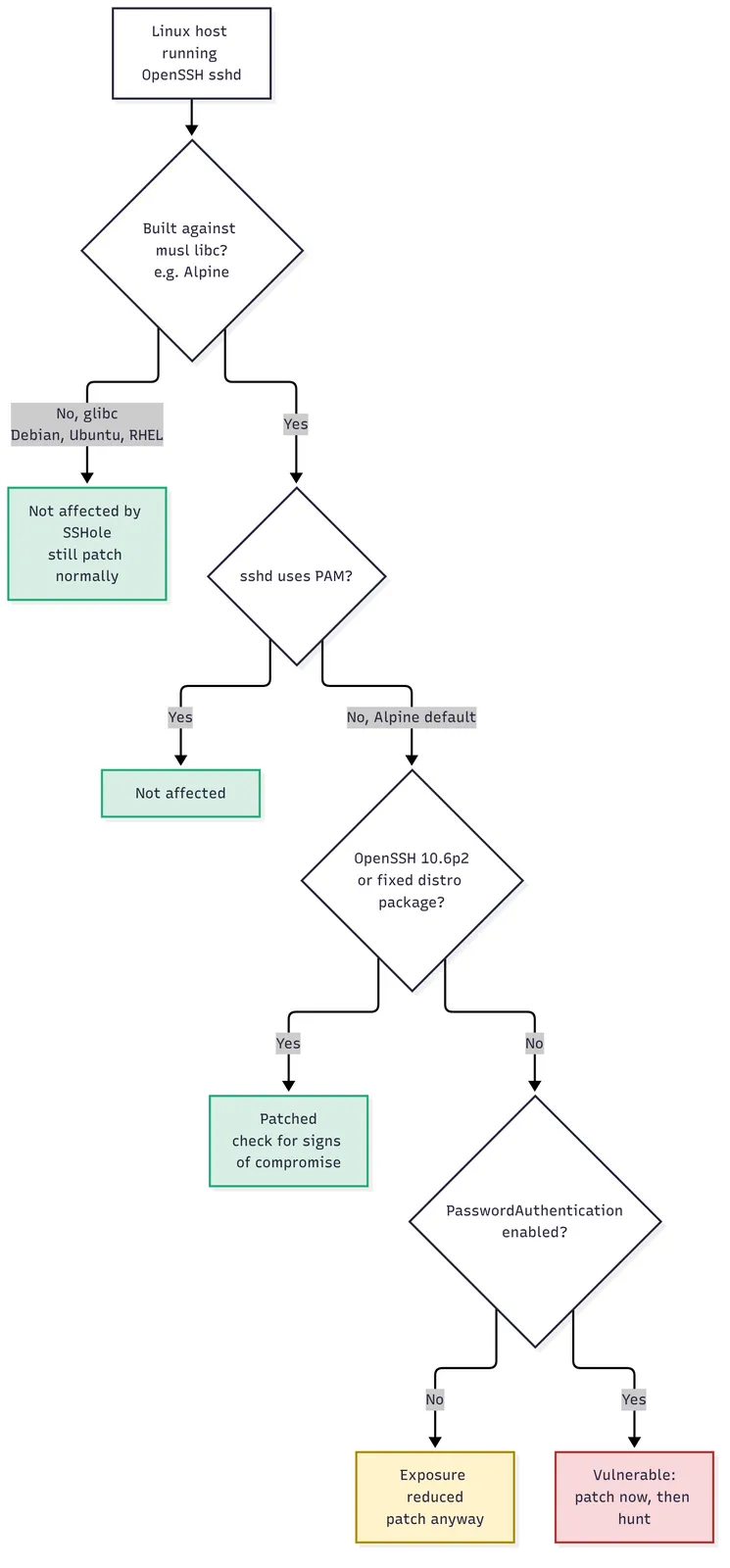 How I sort hosts for SSHole. Only the bottom-right box is an emergency, but every musl box gets patched.
Where Alpine hides in a small business network
When I think about which client systems could be on musl, it’s rarely the main servers. It’s things like:
- Small utility VMs. Alpine is popular for lightweight VMs because it’s tiny. A reverse proxy, a DNS forwarder, a jump box someone built years ago.
- Containers with SSH added. Most containers shouldn’t run
sshd, but some do, especially “convenience” images built for remote file access or a quick admin shell. - Appliances and embedded systems. Some vendors build on a minimal Linux. You won’t always know what libc is inside, and you can’t always patch it yourself.
- Self-hosted tools on a home lab or small office box. The things that get set up once and never logged into again.
The common thread: these are the systems least likely to be in a patch schedule, and the most likely to have password authentication left on because it was easier during setup.
Step 1: Find out where you stand
Here’s a POSIX sh script that works on Alpine’s BusyBox shell as well as on bash. It reports the OS, whether the system uses musl, what OpenSSH package is installed, and the effective sshd settings for PAM and password authentication. Run it as root, because sshd -T needs to read the host keys.
#!/bin/sh
# sshole-check.sh: report SSHole (CVE-2026-123158) exposure on a Linux host.
# Run as root. Works with BusyBox ash (Alpine) and bash.

echo "== $(hostname)"
[ -r /etc/os-release ] && . /etc/os-release && echo "OS:       ${PRETTY_NAME:-unknown}"

if ls /lib/ld-musl-* >/dev/null 2>&1; then libc=musl; else libc=not-musl; fi
echo "libc:     $libc"

SSHD=$(command -v sshd 2>/dev/null || echo /usr/sbin/sshd)
if [ ! -x "$SSHD" ]; then
  echo "sshd:     not installed"
  exit 0
fi

if command -v apk >/dev/null 2>&1; then
  echo "package:  $(apk info -v 2>/dev/null | grep '^openssh-server-[0-9]' | head -n1)"
fi

eff=$("$SSHD" -T 2>/dev/null)
if [ -z "$eff" ]; then
  echo "sshd -T:  failed (run as root, check the config with 'sshd -t')"
  exit 1
fi
pass=$(printf '%s\n' "$eff" | awk '$1=="passwordauthentication"{print $2}')
pam=$(printf '%s\n' "$eff" | awk '$1=="usepam"{print $2}')
# sshd only prints usepam when it was built with PAM support.
[ -z "$pam" ] && pam="no (built without PAM)"
echo "usepam:   $pam"
echo "password: $pass"

if [ "$libc" = musl ] && [ "$pam" != yes ]; then
  if [ "$pass" = yes ]; then
    echo "RESULT:   AT RISK unless openssh is already the fixed package. Patch now."
  else
    echo "RESULT:   musl without PAM, password auth off. Patch anyway."
  fi
else
  echo "RESULT:   not in the SSHole configuration."
fi

# sshd -T without -C ignores Match blocks, so a per-user or per-address
# override can turn passwords back on. Flag configs that have one.
if cat /etc/ssh/sshd_config /etc/ssh/sshd_config.d/*.conf 2>/dev/null \
     | grep -qiE '^[[:space:]]*Match[[:space:]]'; then
  echo "NOTE:     Match blocks present. Check password auth per user/address with 'sshd -T -C'."
fi
To run it across a list of hosts you already reach with keys:
while read -r host; do
  ssh -o BatchMode=yes -o ConnectTimeout=5 "root@$host" 'sh -s' < sshole-check.sh \
    || echo "== $host: could not connect"
done < hosts.txt
Note: feeding the script to ssh with < on each pass also keeps ssh from swallowing the rest of hosts.txt, which is the usual way this kind of loop quietly stops after the first host.
And for Docker hosts, a quick pass over running containers to find any that are musl-based and have an sshd binary:
docker ps --format '{{.Names}}' | while read -r c; do
  if docker exec "$c" sh -c 'ls /lib/ld-musl-* >/dev/null 2>&1 && command -v sshd >/dev/null' 2>/dev/null; then
    echo "$c: musl with sshd present, check it"
  fi
done
If you monitor client networks with LibreNMS (I wrote up how I install it), its device inventory is a good starting list for hosts.txt. Appliances you can’t log into need a different approach: check the vendor’s advisories, and confirm with the vendor what libc and OpenSSH build they ship.
Step 2: Patch, or turn off passwords today
On Alpine, update the whole package set, not just the openssh meta-package, then restart the service:
apk update && apk upgrade
rc-service sshd restart
If you can’t patch a box right away, the workaround in every advisory I’ve read is to turn off password authentication. Make sure key-based login works first, from a second session you keep open, so you don’t lock yourself out:
cp /etc/ssh/sshd_config /etc/ssh/sshd_config.bak
# Put the directive on line 1, ahead of any Include or Match, so it is the global value.
sed -i '1i PasswordAuthentication no' /etc/ssh/sshd_config
sshd -t && rc-service sshd restart

# Any Match block can still turn passwords back on for some users or addresses:
grep -niE '^[[:space:]]*(Match|Include|PasswordAuthentication)' /etc/ssh/sshd_config /etc/ssh/sshd_config.d/*.conf 2>/dev/null

# Check the effective value for a real login: plain "sshd -T" skips Match blocks.
sshd -T -C user=root,host=check,addr=203.0.113.10 | grep -i '^passwordauthentication'
📝 Note: sshd_config uses the first value it finds for most settings, which is why the directive goes on line 1 instead of the bottom of the file (where it could land inside a Match block). Match blocks still override the global value for the users or addresses they match, so read any that the grep turns up, and repeat the sshd -T -C check with the users and source addresses they name. Swap in an address your admins actually connect from.
And if an Alpine box has SSH open to the internet at all, I’d ask why. For most small business systems, SSH belongs behind a VPN or a firewall rule that only allows your management addresses.
Step 3: Assume a vulnerable, exposed box was tried
If a host was in the at-risk state and reachable from the internet after November 7, I’d treat it as possibly compromised until I’d looked. On Alpine, BusyBox syslogd writes to /var/log/messages by default:
# Password logins (these shouldn't happen on a key-only box, and never for root)
grep -E 'sshd.*Accepted (password|keyboard-interactive)' /var/log/messages*

# Accounts with a login shell, and recently changed files in the usual persistence spots
awk -F: '$7 !~ /(nologin|false)$/ {print $1, $7}' /etc/passwd
find /root /home /etc /var/spool/cron -xdev -type f -mtime -14 2>/dev/null
Look for accounts you don’t recognize, new authorized_keys entries, and cron jobs nobody added. If you find any of that, don’t clean it up in place. Rebuild the system from a known-good image, rotate any credentials or keys that lived on it, and check what else it could reach.
What I’m telling clients
For most of the small offices and shops we work with, the answer this week is “you’re not affected,” and that’s a fine answer. But I’d rather get there by checking than by assuming. The systems that hit bugs like this are the ones nobody remembers setting up, and finding them is useful work even when this particular bug misses.
Three habits make the next one of these a non-event:
- Key-only SSH everywhere. Password authentication off, by default, on every Linux system you manage.
- No SSH open to the internet unless there’s a reason written down somewhere.
- An inventory that includes the small stuff. Every VM, container host and appliance, with who’s responsible for patching it.
If you’d like a second set of eyes on what’s running on your network, get in touch.
Sources
- CVE-2026-123158, Ubuntu Security (Canonical), published November 5, 2026
- OpenSSH Release Notes: OpenSSH 10.6p2, OpenSSH, November 5, 2026
- OpenSSH flaw exploited in the wild just hours after disclosure (CVE-2026-123158), Help Net Security, November 6, 2026
- Hackers exploit SSHole OpenSSH flaw to breach Linux systems, BleepingComputer, November 9, 2026
- Known Exploited Vulnerabilities Catalog, CISA (CVE-2026-123158 added November 9, 2026)